我的miniFlux主题

我的miniFlux主题
2024-10-06

最近Follow大火,虽然也在使用,不过我还是更喜欢miniFlux这种简单的阅读器。
之前从 yarr 切换到 miniflux 是因为 木木 大佬推荐的 miniflux 主题 Miniflux-Theme-Reeder,不过当时用了一段时间后发现各种不适,最后还是切换会默认主题,用了一段时间发现其实默认的miniflux已经非常好用了,不过需要做一点美化,所以简单做了一下调整,这里分享一下我的miniflux主题。
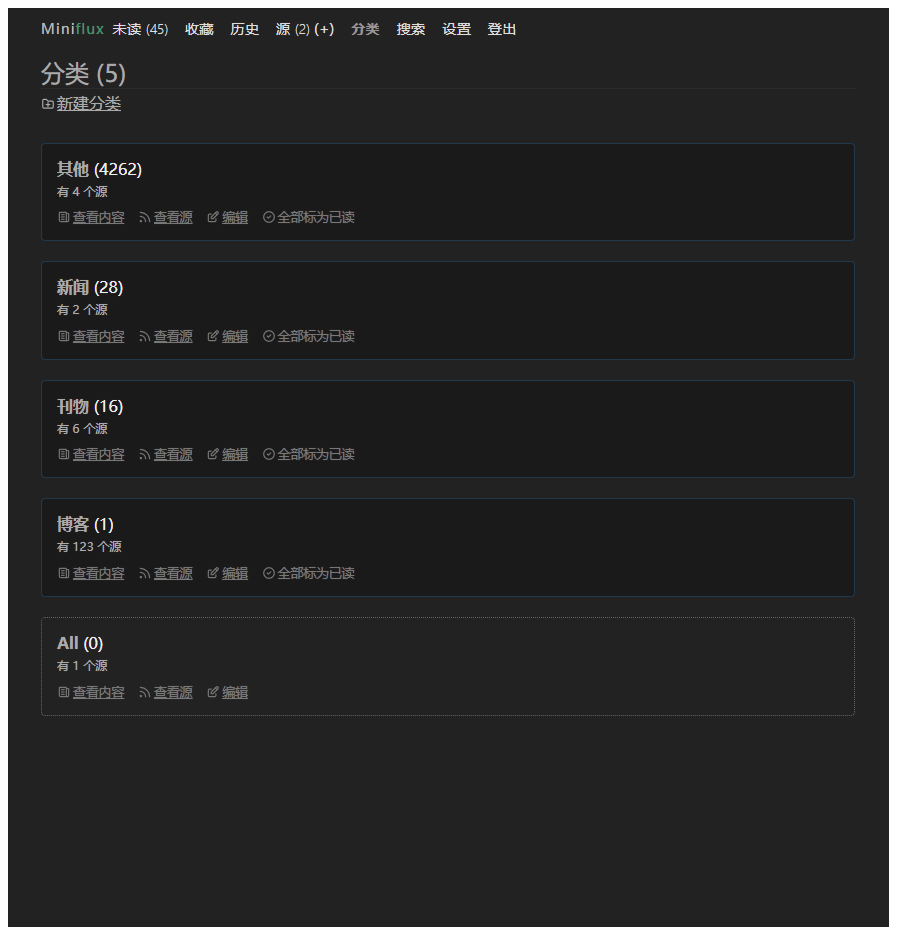
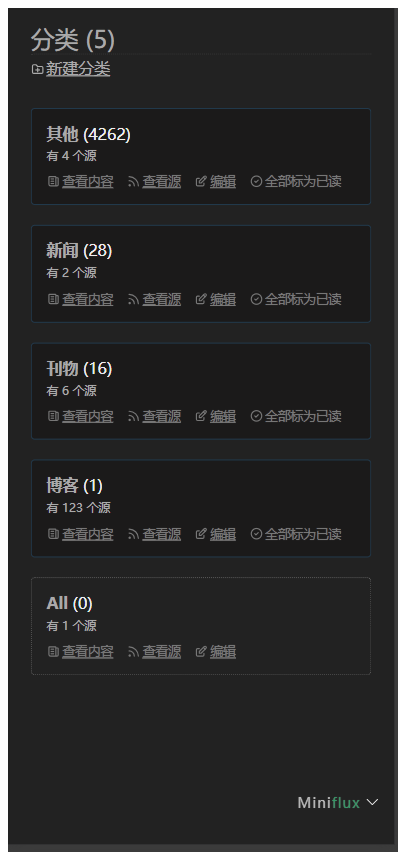
项目地址:https://github.com/rebron1900/mini-miniflux
主题就叫 mini-miniflux ,复制项目中 theme.css 文件中的样式或直接复制下面的css到miniflux中的 custom css 中即可。
:root { --font-family: "Noto Serif SC", system-ui, -apple-system, "Segoe UI", Roboto, "Helvetica Neue", Arial, "Noto Sans", sans-serif, "Apple Color Emoji", "Segoe UI Emoji", "Segoe UI Symbol", "Noto Color Emoji"; --body-color: #efefef; --body-background: #222; --hr-border-color: #555; --title-color: #aaa; --link-color: #aaa; --link-focus-color: #ddd; --link-hover-color: #ddd; --link-visited-color: #f083e4; --header-list-border-color: #333; --header-link-color: #ddd; --header-link-focus-color: rgba(82, 168, 236, 0.85); --header-link-hover-color: rgba(82, 168, 236, 0.85); --header-active-link-color: #9b9494; --page-header-title-color: #aaa; --page-header-title-border-color: #333; --logo-color: #bbb; --logo-hover-color-span: #bbb; --table-border-color: #555; --table-th-background: #333; --table-th-color: #aaa; --table-tr-hover-background-color: #333; --table-tr-hover-color: #aaa; --button-primary-border-color: #444; --button-primary-background: #333; --button-primary-color: #efefef; --button-primary-focus-border-color: #888; --button-primary-focus-background: #555; --input-border: 1px solid #555; --input-background: #333; --input-color: #ccc; --input-placeholder-color: #666; --input-focus-color: #efefef; --input-focus-border-color: rgba(82, 168, 236, 0.8); --input-focus-box-shadow: 0 0 8px rgba(82, 168, 236, 0.6); --alert-color: #efefef; --alert-background-color: #333; --alert-border-color: #444; --alert-success-color: #efefef; --alert-success-background-color: #333; --alert-success-border-color: #444; --alert-error-color: #efefef; --alert-error-background-color: #333; --alert-error-border-color: #444; --alert-info-color: #efefef; --alert-info-background-color: #333; --alert-info-border-color: #444; --panel-background: #333; --panel-border-color: #555; --panel-color: #9b9b9b; --modal-background: #333; --modal-color: #efefef; --modal-box-shadow: 0 0 10px rgba(82, 168, 236, 0.6); --pagination-link-color: #aaa; --pagination-border-color: #333; --category-color: #efefef; --category-background-color: #333; --category-border-color: #444; --category-link-color: #999; --category-link-hover-color: #aaa; --item-border-color: #666; --item-padding: 15px; --item-title-link-font-weight: 900; --item-status-read-title-link-color: #666; --item-status-read-title-focus-color: rgba(82, 168, 236, 0.6); --item-meta-focus-color: #aaa; --item-meta-li-color: #ddd; --current-item-border-width: 2px; --current-item-border-color: rgba(82, 168, 236, 0.8); --current-item-box-shadow: 0 0 8px rgba(82, 168, 236, 0.6); --entry-header-border-color: #333; --entry-header-title-link-color: #bbb; --entry-content-color: #999; --entry-content-code-color: #fff; --entry-content-code-background: #555; --entry-content-code-border-color: #888; --entry-content-quote-color: #777; --entry-content-abbr-border-color: #777; --entry-enclosure-border-color: #333; --parsing-error-color: #eee; --feed-parsing-error-background-color: #3a1515; --feed-parsing-error-border-style: solid; --feed-parsing-error-border-color: #562222; --feed-has-unread-background-color: #1b1a1a; --feed-has-unread-border-style: solid; --feed-has-unread-border-color: rgb(33 57 76); --category-has-unread-background-color: #1b1a1a; --category-has-unread-border-style: solid; --category-has-unread-border-color: rgb(33 57 76); --keyboard-shortcuts-li-color: #9b9b9b; --counter-color: #bbb --entry-content-font-weight: 300; --entry-content-font-family: "Noto Serif SC", system-ui, -apple-system, "Segoe UI", Roboto, "Helvetica Neue", Arial, "Noto Sans", sans-serif, "Apple Color Emoji", "Segoe UI Emoji", "Segoe UI Symbol", "Noto Color Emoji"; --entry-content-quote-font-family: var(--entry-content-font-family) --gray-100: rgba(196, 196, 196, 0.1); --gray-200: rgba(196, 196, 196, 0.2); --gray-500: rgba(196, 196, 196, 0.5); --gray-700: rgba(196, 196, 196, 0.7);
--color-link: #84b2ff; --color-visited-link: #84b2ff;
--body-font-color: #e9ecef; --color-hover-link: #589ff2;
--btn-color: red; --btn-bg: blue;
--icon-filter: brightness(0) invert(1);
--box-radius: 0.25rem;
--hint-color-info: #6bf; --hint-color-warning: #fd6; --hint-color-danger: #f66; }
- { font-family: var(--entry-content-font-family); text-shadow: 0 0 .75px var(--gray-500); }
main { .item { border-radius: var(--box-radius); } }
@media (max-width: 630px) { body { padding: 0 1.25rem; }
.page-header{ margin-top: 1rem; }
.header { position: fixed; bottom: 10px; right: 10px;
#header-menu { background-color: var(--alert-border-color); padding: 10px; border-radius: var(--box-radius); list-style: none; } } } .entry-content { line-height: 1.8;
:first-child { margin-top: 0; }
h1, h2, h3, h4, h5, h6 { font-weight: bolder; line-height: 1; margin-top: 1.5em; margin-bottom: 1rem;
a.anchor { opacity: 0; font-size: 0.75em; vertical-align: middle; text-decoration: none; }
&:hover a.anchor, a.anchor:focus { opacity: initial; } }
h4, h5, h6 { font-weight: bolder; }
h5 { font-size: 0.875em; }
h6 { font-size: 0.75em; }
b, optgroup, strong { font-weight: bolder; }
a { color: var(--color-link); text-underline-offset: 0.3em;
&:hover { color: var(--color-hover-link); text-shadow: 0 0 0.75px var(--color-hover-link); } &:visited { color: var(--color-link); } }
img { max-width: 100%; height: auto; border-radius: 0.25rem; }
code { padding: 0 0.25rem; background: var(--gray-200); border-radius: 0.25rem; font-size: 0.875em; }
pre { padding: 1rem; background: var(--gray-200); border-radius: 0.25rem; overflow-x: auto; position: relative;
code { padding: 0; background: none; color: white; } }
p { word-wrap: break-word; margin-bottom: 1.3rem; }
/ adapter ghost callout cards / blockquote, .kg-callout-card { margin: 1rem 0; padding: 0.5rem 1rem 0.5rem (1rem - 0.25rem);
border-inline-start: 0.25rem solid var(--gray-200); border-radius: 0.25rem;
color: var(--gray-700); font-style: italic;
word-break: break-all;
:first-child { margin-top: 0; } :last-child { margin-bottom: 0; } }
table { overflow: auto; display: block; border-spacing: 0; border-collapse: collapse; margin-top: 1rem; margin-bottom: 1rem;
tr th, tr td { padding: 0.5rem 1rem; border: $padding-1 solid var(--gray-200); }
tr:nth-child(2n) { background: var(--gray-100); } }
hr { height: 1px; border: none; background: var(--gray-200); }
ul, ol { padding-inline-start: 2rem; word-wrap: break-word; }
dl { dt { font-weight: bolder; margin-top: 1rem; }
dd { margin-inline-start: 0; margin-bottom: 1rem; } }
.highlight table tr { td:nth-child(1) pre { margin: 0; padding-inline-end: 0; } td:nth-child(2) pre { margin: 0; padding-inline-start: 0; } }
details { padding: 1rem; border: $padding-1 solid var(--gray-200); border-radius: 0.25rem;
summary { line-height: 1; padding: 1rem; margin: -1rem; cursor: pointer; }
&[open] summary { margin-bottom: 0; } }
figure { margin: 1rem 0; figcaption p { margin-top: 0; } } }


